
What is Trelium?
Trelium runs AI agents that handle repetitive office work, like entering orders from emails, inside the software your team already uses. Learn what an agent is, what work it handles, and where your team stays in charge.
Trelium is a platform for AI agents that take on repetitive office work, such as entering purchase orders from emails into your order system or answering "is this in stock?" questions from customers. Each agent works inside the software your team already uses, and your team reviews anything important before it goes through.
What kind of work does Trelium handle?
Trelium is built for work that follows the same pattern every time but arrives in messy, inconsistent forms. A purchase order might come in as a PDF one day, a spreadsheet the next, and a plain email after that. The job is always the same (read it, check it, enter it), but today someone on your team does it by hand. Common examples:
- Entering purchase orders and customer orders from emails, PDFs, and spreadsheets (see the Purchase Order Entry recipe)
- Answering order status and stock questions using up-to-date numbers
- Matching supplier invoices to the purchase orders and sales orders they belong to (see the Invoice Matching recipe)
- Following up on proposals, proofs, and overdue invoices
- Keeping an eye on suppliers and flagging delays
- Building reports from the data in your systems
Each of these jobs is handled by its own agent. Names like "PO entry agent" or "order status agent" are just examples of the kind of job, not fixed product names. The full list of use cases is on the use cases page.
What is a Trelium agent?
A Trelium agent is software set up to do one specific job from start to finish. A helpful way to picture it is a dependable new hire with a written procedure. It knows what signals the start of a job, which steps to follow, which rules to check, and when to stop and ask someone. That written procedure is called a workflow. Agents & Workflows explains how the two fit together.
Your team can describe and build agents in natural language, and the Trelium team helps with setup. You do not have to build everything alone, and Trelium does not have to build every agent for you.
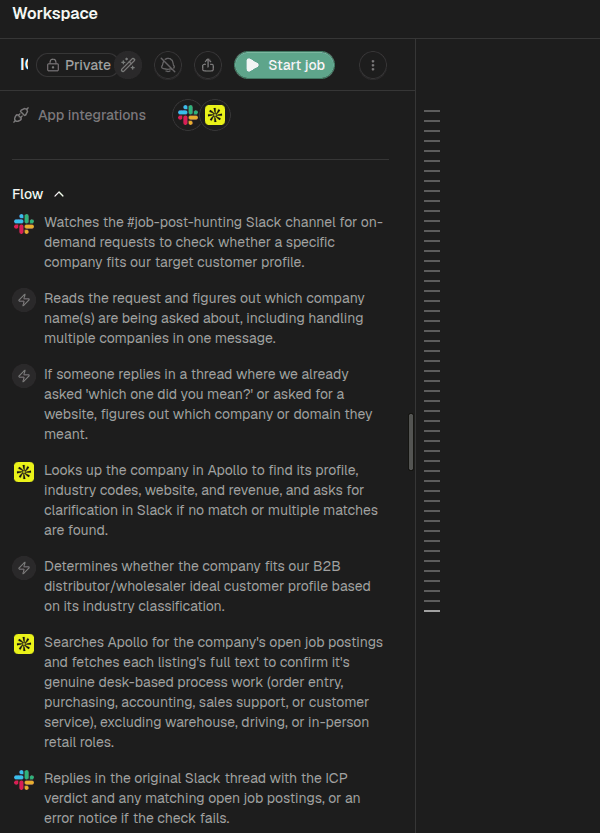
An example agent's written procedure, which Trelium calls its Flow. This one checks whether a company fits a target customer profile. It starts when someone posts a request in a Slack channel, looks the company up in Apollo, and replies in the same Slack thread.
An agent is not a chatbot. You don't type questions to it and wait for a reply. It watches for work, such as a new customer email, does the job, and leaves the result where your team already looks, such as a draft order in your order system or a suggested answer in your shared inbox.
Do I have to replace my current software?
No. Trelium does not replace your order system, accounting software, CRM, or any other tool, and there is no data to move. Your existing tools stay the official home for your data, which these docs call your systems of record. The agent reads from them, does its work, and writes the result back into them.
Trelium connects to your tools in one of two ways. If a tool offers a built-in connection for other software to use (called an API), the agent can use that. If it doesn't, the agent can work in the tool through a web browser, much like a person logging in: it signs in, opens pages, and fills in fields. That description is about how the agent works day to day, not a promise that every login challenge or interface change will succeed without help. Integrations explains both approaches, and the integrations catalog lists the systems Trelium works with.
Where does AI come in?
AI handles the parts of a job that need reading and interpretation. That includes pulling line items out of a PDF, working out which order a customer's email is about, or noticing that a request is missing something. Everything else follows fixed steps that run the same way every time, and your business rules decide what counts as correct. When something is unclear, unusual, or high-stakes, the agent passes it to a person instead of guessing.
AI reads. Rules decide.
AI interprets what comes in. Fixed steps and rule checks decide what happens next. Anything unclear or risky goes to a person.
How Trelium Works walks through each stage of a job, from the moment work arrives to the record that's kept afterward.
An example: checking whether a company is a good fit
A sales team wants to know whether a company is worth pursuing. Someone posts the company's name in a team Slack channel, and a Trelium agent does the research and replies in the same thread. It works out which company was named, looks it up in Apollo, and compares its industry with the team's description of an ideal customer. It also searches for the company's open job postings and reads each one, keeping only roles that involve office-based process work, such as order entry or accounting, and skipping roles like warehouse, driving, or in-person retail. The reply gives a yes or no on fit, plus any matching postings. If the check fails, the reply says so.
When the agent can't tell which company was meant, because the name matches several companies or none, it asks in the thread instead of guessing. Nobody on the team has to look anything up by hand, and the answer arrives in the tool they were already using.
The company-check agent at work. The recording shows its Flow in Trelium, then its replies in the Slack channel, with a fit verdict and any matching job postings for each company.
Where to go next
Home
Documentation for Trelium, a platform of AI agents that handle repetitive office work, like entering orders from emails, inside the software your team already uses.
How Trelium Works
A teaching model of how a Trelium agent finishes a job in eight stages. Covers how a job starts, where AI is used, how results are checked, when a person reviews, and how every job is recorded.