
Invoice Matching
How a Trelium agent checks a supplier invoice against the purchase order it belongs to before the bill goes into your accounting system. Covers what comes in, the software used, the stages, the rules it checks, item matching, when a person steps in, which parts use AI, and three example invoices.
An invoice matching agent reads each supplier invoice that comes in, finds the purchase order (PO) it belongs to, and compares the two line by line: which items, how many, and at what price. If every line matches, the agent creates the bill in your accounting system, which is your record of what you owe the supplier. If a line doesn't match, the agent stops before anything is recorded and sends the invoice to a person, so a price that's too high or the wrong item never becomes a bill without someone checking it first.
This recipe matches against the PO
Some public Trelium materials describe matching an invoice to a sales order, or using configured price and quantity tolerances. Those are different workflow choices. This recipe matches against the purchase order, uses exact line checks unless your team writes a tolerance rule, and does not assume a goods-receipt (three-way) match or a posted-versus-draft accounting status. Write your own version for the systems and rules you use.
Write your own version first
This recipe follows the same pattern as Purchase Order Entry. Use the template on Define a Workflow to write a version that fits your suppliers, your software, and your rules.
An invoice matching agent at work, from Trelium's video How AI Automates 3-Way Invoice Matching. The video also checks the goods receipt (a three-way match). This recipe matches the invoice against the PO only, and the screenshots below come from a separate example build that uses a Google Sheet as the accounting system.
At a glance
| Part | In this recipe |
|---|---|
| What comes in (inputs) | A supplier email with the invoice attached as a PDF, or an invoice someone shares with the agent |
| Software it uses (systems) | The inbox invoices arrive in, the system that holds your purchase orders, and your accounting system |
| Steps | The eight stages below, from the invoice arriving to the job being recorded |
| Rules it checks (business rules) | Known supplier, a matching open PO, every line on that PO, quantities and prices that agree with the PO, invoice not entered before |
| How it checks (validation) | It compares the invoice with the PO and your accounting records before recording anything |
| Problems it flags (exceptions) | Anything that fails a check, such as an item that isn't on the PO or a price above the PO price |
| Where a person steps in (human review) | A person deals with every mismatch before a bill is created |
| What it produces (outputs) | A bill in your accounting system, a message to a person when something doesn't match, and a record of the job |
What comes in
The agent works on the supplier's invoice. Most arrive as a PDF attached to an email, but layouts differ from supplier to supplier: one puts the PO number in the header, another in a reference field, and a third leaves it off. The agent reads each one and picks out the same details every time. See Triggers & Inputs.
The software it uses
This recipe uses three pieces of software. The inbox is where invoices arrive, and a shared inbox such as ap@ works better than one person's inbox. The system that holds your purchase orders is where the agent finds what you actually ordered, and for many teams that is the same as the accounting system. Your accounting system is where the bill is created.
If a system has a built-in connection for other software (called an API), the agent uses it. If not, it can log in and use the same screens your team does, which Trelium calls a browser agent. Check the Integrations page or ask the Trelium team about the systems you use. Your POs and bills stay where they are today.
The eight stages
The agent's work is recorded in runs in its Activity log. Every invoice goes through these stages.

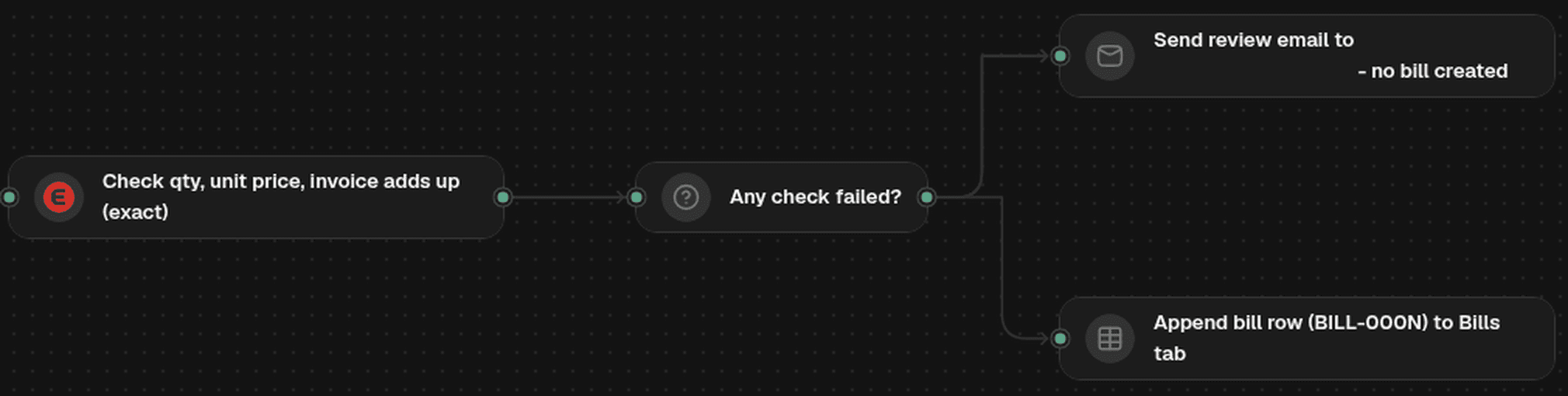
The Flow of an example invoice matching agent, in two parts. In this example build, a Google Sheet stands in for the accounting system and its prices must match the PO exactly. Problems go to a person by email, and matched invoices become a bill row.
1. The invoice arrives
A new email in the invoices inbox starts the job. Trelium calls this the trigger, and the email and its attachment are the input.
2. Read the invoice
The agent reads the invoice and picks out the supplier, the invoice number, the PO number if there is one, and the item, quantity, and price on each line, along with the total. This is reading work, so AI does it. What it reads is treated as a first draft that the later stages check.
3. Find the purchase order
The agent looks up the PO the invoice belongs to, using the PO number on the invoice and the supplier. It also checks whether this invoice number has already been entered for this supplier. It only matches against a PO that is still open, meaning it hasn't been fully billed yet. If it can't find exactly one open PO that fits, it doesn't guess.
4. Match each invoice line to a PO line
Suppliers describe items in their own words and often use their own item codes, not yours. The agent matches each invoice line to a line on the PO, using the code, the description, and the other lines. AI suggests the match, and stage 5 checks it. A line that matches nothing on the PO stays unmatched.
5. Check quantities and prices
For each matched line, the agent compares the invoice quantity with the PO quantity and the invoice price with the PO price. It also checks that the invoice adds up. These checks follow set rules and work the same way every time. See Validation & Exceptions.
6. Send mismatches to a person
If any check fails, the agent does not create the bill. Trelium calls this an exception. The invoice goes to a person with the failed lines marked, the invoice values next to the PO values, and what the agent read. See Human in the Loop.
7. Create the bill
Once every line matches, and anything that needed a person has been dealt with, the agent creates the bill in your accounting system against the supplier, with the invoice number and the PO it matched. Creating the bill is where this recipe ends. Paying the supplier stays with your team's usual process.
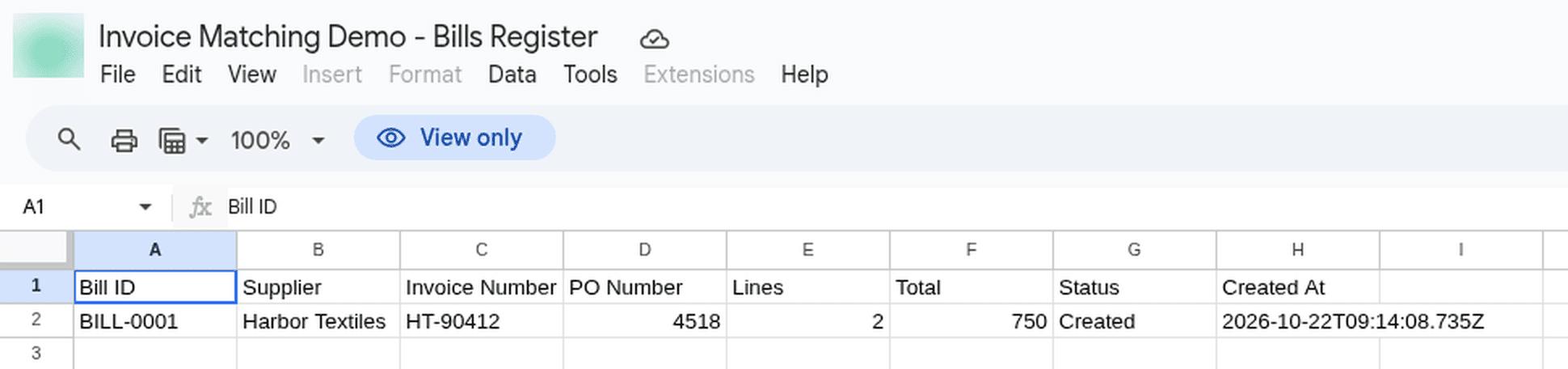
The bill the agent created for Invoice 1, with the supplier's invoice number and the PO it matched. In this example build the accounting system is a spreadsheet.
8. Keep a record
The job is saved in the agent's Activity log, which shows each step the agent took, when it happened, and how the job ended. See Logs & Audit Trails.
The rules it checks
Your rules decide when an invoice is ready to become a bill.
| Rule | What the agent compares |
|---|---|
| The supplier is in your system | The supplier it found, against your supplier list |
| There is one open PO for this invoice | The PO number and supplier, against your open purchase orders |
| Every invoice line is on the PO | Each invoice line, against the lines on that PO |
| Each quantity agrees with the PO | Each invoiced quantity, against the quantity ordered |
| Each price agrees with the PO | Each invoiced price, against the price on the PO |
| The invoice adds up | The line totals and the invoice total |
| The invoice hasn't been entered before | The invoice number, against this supplier's past bills |
Some teams accept a small price difference, such as rounding. If yours does, write down the exact difference you accept as one of your rules, so the agent checks against a number your team chose instead of deciding for itself what counts as close enough.
When something doesn't match
The person sees what the agent read, which PO it compared against, and which check failed, so they don't have to start from scratch.
| Problem | What the agent does | What the person does |
|---|---|---|
| No PO found, or more than one fits | Stops before recording anything and sends the invoice to a person | Finds the right PO or asks the supplier |
| Item not on the PO | Sends the invoice to a person with that line marked | Decides whether the supplier sent a different item on purpose, made a mistake, or the PO is missing a line |
| Quantity doesn't agree with the PO | Sends the invoice to a person with that line marked | Checks what was ordered and received |
| Price doesn't agree with the PO | Sends the invoice to a person with that line marked | Decides whether to accept the price or go back to the supplier |
| Invoice doesn't add up | Sends the invoice to a person | Checks the totals with the supplier |
| Invoice number already entered | Stops before recording anything and sends the invoice to a person | Checks whether it is a duplicate or a new invoice |
AI reads. Rules decide.
AI can misread a code or match a line to the wrong item, just as a person can. That is why a line that doesn't agree with the PO stops the job, instead of becoming a bill just because the AI read it that way.
Which parts use AI
AI does the reading and the line matching. Everything else follows set rules: given the same records and rules, the same invoice takes the same path, as How Trelium Works explains.
| Stage | Done by | Why |
|---|---|---|
| 1. The invoice arrives | Set rules | A new email in the inbox starts the job |
| 2. Read the invoice | AI | Invoices come in many layouts |
| 3. Find the purchase order | Set rules | The PO comes straight from your records |
| 4. Match each invoice line to a PO line | AI | Supplier codes and descriptions have to be read and matched to your items |
| 5. Check quantities and prices | Set rules | Each check is a comparison that works the same way every time |
| 6. Send mismatches to a person | A person | When a check fails, a person decides instead of the agent guessing |
| 7. Create the bill | Set rules | The bill is only created after every check passes |
| 8. Keep a record | Set rules | Every job is saved in the Activity log |
Example: three invoices on a Tuesday
Three supplier invoices arrive in the invoices inbox. The suppliers, items, and numbers are made up.
flowchart LR
A[Invoice 1: Harbor Textiles every line matches] --> D[Bill created]
B[Invoice 2: Northline Safety item not on the PO] --> E[Sent to accounts payable]
C[Invoice 3: Crestway Packaging price above the PO] --> F[Sent to the buyer]
The orange boxes are where a person steps in before any bill is created.
Invoice 1: every line matches
Harbor Textiles sends invoice HT-90412 for PO 4518, with two lines. The agent finds PO 4518, matches both lines, and finds the same quantities and prices as the PO. The invoice adds up and hasn't been entered before. The agent creates the bill in your accounting system, and the job is saved in the Activity log.
Invoice 2: an item that isn't on the PO
Northline Safety sends invoice NS-7731 for PO 4522. The PO is for 50 high-visibility vests, yellow, size L, your item VEST-YL-L. The invoice line reads "SV-220-XL Hi-Vis Vest Yellow XL, 50 @ $8.40". The agent reads the supplier's code and description, and the closest PO line is a different size. Size XL is not on the PO, so the line stays unmatched.
The agent stops before creating the bill and sends the invoice to accounts payable, the team that handles supplier bills, with the line marked, showing the invoice line next to the PO line it came closest to. The person checks with the warehouse, which confirms XL vests arrived in place of size L, and the buyer had agreed to the swap by phone. What happens next is your team's call, such as correcting the PO or entering the bill by hand.
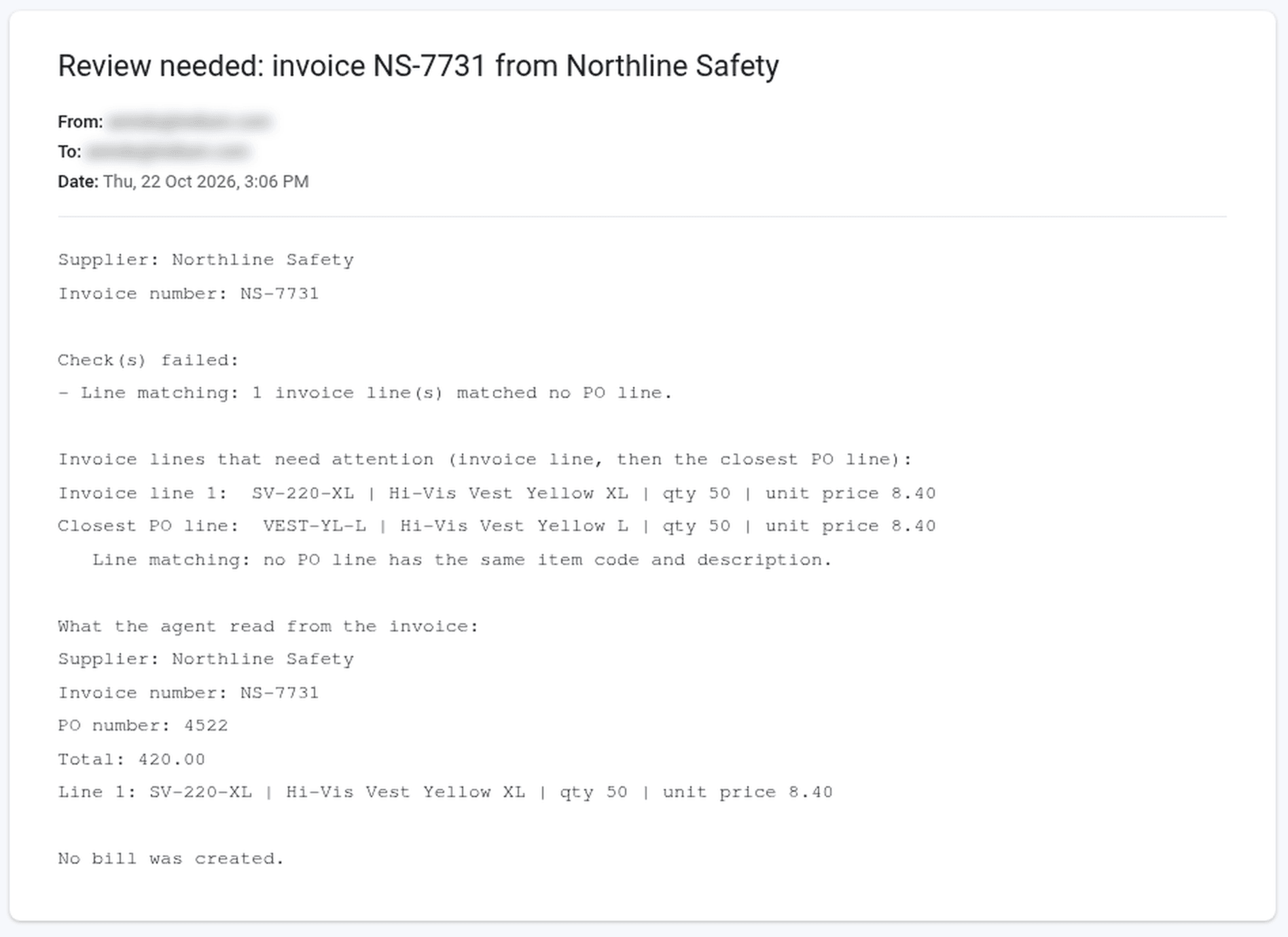
The review request for Invoice 2. It names the check that failed, shows the invoice line above the closest PO line, lists what the agent read, and says no bill was created.
Invoice 3: a price above the PO
Crestway Packaging sends invoice CP-2210 for PO 4530, with one line: 400 shipping boxes at $1.32 each. The PO price is $1.20. Every item matches and the quantity agrees, but the price check fails. The agent sends the invoice to the buyer who placed the PO, with the invoice price and the PO price side by side. The buyer decides whether to accept the new price or go back to the supplier.
Before you build
Write your own plan with the Define a Workflow template, using your suppliers, invoice formats, and rules. Then try the agent on past invoices your team has already matched, including a few that caused trouble, and compare its result with what your team decided at the time. See Testing a Workflow.
Where to go next
Purchase Order Entry
How a Trelium agent turns a customer's purchase order into a draft sales order in your order system. Covers what comes in, the software used, the nine stages, the rules it checks, when a person steps in, which parts use AI, and three example POs.
Security & Data
What a Trelium agent can get into, how you limit it, where your data stays, how your team signs in, what is recorded, and where to find Trelium's security policies and audit status.