
Define a Workflow
How to write down a job before a Trelium agent takes it on. Covers the eight things to write down (what starts the job, what comes in, which software is used, the steps, the rules, what can go wrong, where a person signs off, and the finished result), a filled-in example for entering purchase orders, and a blank template to copy.
Before an agent takes on a job, write the job down. You need eight things: what starts the job, what comes in, which software is used, the steps in order, the rules that must be met, what to do when something doesn't match, where a person signs off, and what the finished result looks like. This short plan is what the agent follows. Writing it first shows you the gaps early, while they are easy to fix, and gives you something to check the agent against later.
Start from a job you have watched
The plan is easiest to write after you have sat with the person who does the job today and watched how they do it. If you have not picked a job yet, start with Choosing a Workflow.
The eight things to write down
Each one answers a simple question about the job. The Trelium docs use the names in the first column, so they are worth learning.
| Name | The question it answers | Read more |
|---|---|---|
| Trigger | What starts the job? | Triggers & Inputs |
| Inputs | What does the agent get to work on, such as an email or a file? | Triggers & Inputs |
| Systems | Which software does the agent look in, and which does it change? | Connecting Systems |
| Steps | What does the agent do, in what order? | Agents & Workflows |
| Business rules | What must be true before anything goes into your systems? | Validation & Exceptions |
| Exceptions | What happens when something doesn't match the rules? | Validation & Exceptions |
| Human approvals | What must a person sign off, even when everything looks right? | Human in the Loop |
| Output | What does the finished result look like, and where does it end up? | How Trelium Works |
Two pairs are easy to mix up. Business rules are the things the agent checks, and exceptions are what happens when a check fails. Exceptions only come up when something is wrong, while human approvals can happen on every job, because some steps your team wants to sign off no matter what. Keeping them apart makes it clear what a person will be asked to look at, and why.
Example: entering purchase orders
Here is a filled-in plan for an agent that enters customer purchase orders (POs). The team, inbox, and rules are made up, so swap in your own. Each part shows what was written, then why.
Trigger
Filled in: A new email arrives in the orders@ shared inbox.
POs already come in by email, so a new email in the team's usual inbox is what starts the job. A shared inbox like orders@ works better than one person's inbox, as Connecting Systems explains. If that inbox also gets emails that are not POs, say so here, so the agent is set up to deal only with POs.
Inputs
Filled in: The email and any attachment. The PO may be a PDF, a spreadsheet, or typed in the email itself.
Customers send POs in different ways, and listing them reminds you to test each one. The agent reads every kind and picks out the same details each time, so you don't need different instructions for each format. See Triggers & Inputs.
Systems
Filled in:
- orders@ inbox: look only
- Order system: look up customers, items, agreed prices, and past orders, and create draft sales orders
- Quantity limits: look only. Your team sets the lowest and highest quantity it accepts from each customer, and keeps the list somewhere the agent can read, such as a spreadsheet.
For each piece of software, write down whether the agent only looks or also makes changes. That decides what access the agent needs. If it is only allowed to look at a system, it cannot change anything there. Here the agent only reads the inbox, but it both reads and adds to the order system.
Steps
Filled in:
- Read the email and any attachment.
- Work out which customer sent the PO.
- Pick out the PO number, items, quantities, prices, ship-to address, and requested date.
- Look up the customer, each item, and the agreed prices in the order system, and this customer's quantity limit.
- Check the PO against the business rules.
- Send anything that doesn't match to a person.
- Create a draft sales order in the order system.
- Keep a record of the job.
Write the steps in order, one action each, like a checklist. Steps 1 to 3 mean reading and understanding a document, so AI does them. Lookups and checks follow defined rules; failed checks go to the order desk. The draft is created only after required review. How Trelium Works explains why the work is split like this.
Business rules
Filled in:
- The customer is in the order system.
- Every item is in the order system.
- Each price matches the price agreed with this customer.
- Each quantity is within the quantity limit your team set for this customer.
- This PO number has not been entered before for this customer.
- The PO has a ship-to address and a requested date.
Every rule here can be checked against something already in your systems. "The price looks about right" can't be checked, but "the price matches what we agreed with this customer" can, because the agreed price is in the order system. The rules are set when the agent is built, and the agent follows them the same way on every job. See Validation & Exceptions.
Exceptions
Filled in:
- Customer not found: stop and send it to the order desk.
- Price doesn't match: hold those lines until someone approves them.
- Item not found: send it to the order desk.
- Quantity above or below this customer's limit: send it to the order desk.
- No ship-to address or requested date: ask the order desk for it.
- PO number already entered: stop and send it to the order desk.
Each rule has an answer for what happens when it fails, so nothing gets stuck with nowhere to go. They are not all handled the same way. A wrong price needs a decision, a missing date needs someone to fill it in, and an unknown customer needs someone to work out who sent the PO. Writing this down means the agent never has to guess.
Human approvals
Filled in: Any line with a price different from the agreed price. The agent does not release orders. The order desk releases each draft in the order system.
A different price needs a person's OK because it involves money, and Human in the Loop recommends a sign-off for anything that does. Releasing the order stays with the order desk, so the agent prepares the order and a person decides when it goes ahead. Start with more sign-offs than you think you need. Remove one only after the agent has got that step right many times.
Output
Filled in: A draft sales order in the order system, with the customer's PO number on it, ready for the order desk to release.
Say what the result is, where it ends up, and what should be on it. That way anyone can put the draft next to the original PO and see if it is right. It is also what you check against when you test the agent.
To see this job from start to finish, including three example POs, read the Purchase Order Entry recipe. It also shows which parts follow set rules and which parts use AI.
Blank template
Copy this and fill it in for your own job. Keep each answer short and clear enough that someone else could check it.
Trigger:
Inputs:
Systems:
Steps:
Business rules:
Exceptions:
Human approvals:
Output:
Check your plan before you build
Read your finished plan and ask:
- For each piece of software, does it say whether the agent only looks or also makes changes?
- Can every rule be checked against something in your systems?
- Does every rule say what happens when it fails, and who deals with it?
- Is it clear which steps a person signs off, and which a person still does by hand?
- Could someone put the result next to what came in and tell if it is right?
When you set up the agent, your plan already has what Trelium needs to hear: what starts the job, where the information comes from, when a person steps in, and what the finished result should be. Your First Workflow shows how to describe a job to Trelium.
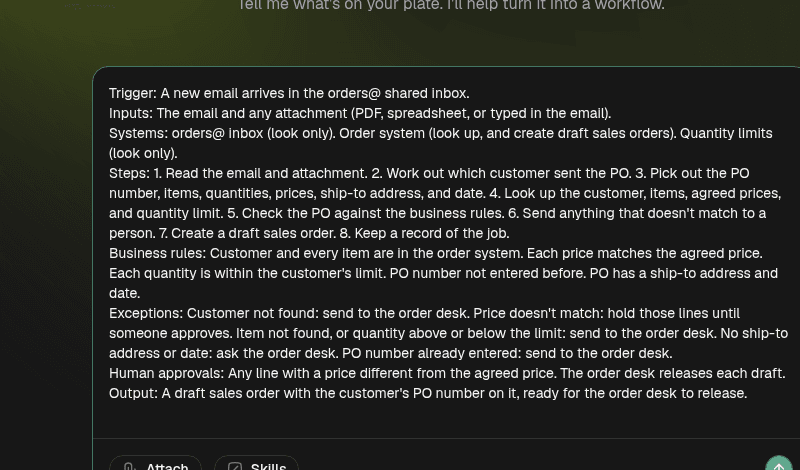
The purchase order plan from this page, typed into Trelium as the description of the job. Each of the eight parts goes on its own line.
Where to go next
Validation & Exceptions
How Trelium agents check their work against your business rules before acting. Covers what a check is, what an exception is, where exceptions go, and how checks decide what needs a person.
Purchase Order Entry
How a Trelium agent turns a customer's purchase order into a draft sales order in your order system. Covers what comes in, the software used, the nine stages, the rules it checks, when a person steps in, which parts use AI, and three example POs.