
How Trelium Works
A teaching model of how a Trelium agent finishes a job in eight stages. Covers how a job starts, where AI is used, how results are checked, when a person reviews, and how every job is recorded.
These docs use eight stages as a teaching model for how an agent finishes a job. Something signals that there's work to do, the agent collects the information it needs, follows its set steps, uses AI to make sense of anything messy, checks the result against your rules, asks a person when needed, enters the result into your systems, and keeps a record. A real agent does not have to follow every stage in this order, or only once. In the product, steps have action names rather than these eight labels.
flowchart LR
A[1. Trigger] --> B[2. Gather context] --> C[3. Execute steps] --> D[4. Reason] --> E{5. Validate} -->|Passes| G[7. Update systems] --> H[8. Log]
E -->|Needs a person| F[6. Human review] -->|Approved| G
In this model, the purple stage is where AI does the reading and interpreting, and the orange stage is where a person steps in (only some runs take that path). Fixed rules and lookups sit in the other stages. The diagram shows the simplest path. A real workflow can use a stage more than once or in a different order, as the example at the end of this page shows.
Each time an agent goes through these stages, that's called a run. A run can handle a single piece of work, such as one customer email, or several at once, and each run is one row in the agent's Activity log.
The eight stages
1. Trigger: something starts the job
Every run starts with a trigger. It can be an event, like a customer email arriving in an inbox, a webhook or integration event, someone starting a job by hand, or a schedule, like a check every morning at 8. The trigger also hands the agent the item it needs to work on, such as the email, its attachment, a form, or a request. See Triggers & Inputs.
2. Gather context: collect the facts
Before doing anything, the agent gathers the information it needs to understand the job. That can mean looking up the customer, finding the order the email refers to, or checking current stock, prices, or order status. It reads this from your actual systems at the moment of the run, so it works from today's numbers rather than an old copy.
3. Execute steps: follow the set procedure
The workflow runs its steps in a fixed order, like working through a checklist. The same input always takes the same path, which is what makes the agent predictable. (Technical teams call these deterministic steps.) A step might read from a system, look something up in a supplier's website, apply a rule, or prepare a record.
4. Reason: make sense of anything messy
AI handles the parts that need interpretation, such as pulling line items out of a PDF, working out which order an email is about, or deciding whether a request has everything it needs. What AI produces is a draft, not a final decision. It does not get to decide on its own what goes into your systems.
5. Validate: check before acting
Before anything is entered, the agent checks the draft against your business rules. Does this product exist? Does the price match what was agreed with this customer? Is the quantity within the limits your team set? When a check fails, the agent doesn't quietly carry on. It flags the problem as an exception and sends it to the next stage. See Validation & Exceptions.
6. Human review if needed: a person makes the call
A person reviews the cases that need judgment. These include unclear requests, failed checks, and anything that affects money, promises to customers, or inventory. The reviewer sees what the agent proposes and why it was flagged, so they don't have to start from scratch. Routine cases that pass every check can go through without review. Your team defines which cases need a person when you build the workflow, with help from the Trelium team. See Human in the Loop.

A review request in Slack. The agent couldn't read the invoice PDF, so instead of guessing it explains why and lets a person approve, reject, or ask the supplier.
7. Update systems: enter the result
Once the result has passed its checks, and been approved if approval is required, the agent enters it into the right system. That might be a new order in your order system, a note on a support ticket, a drafted reply, or an entry in your accounting software. If the system offers a built-in connection for other software (an API), the agent can use it. If it doesn't, the agent can work in the system through a web browser. See Integrations.
8. Log: keep a record
Every run is recorded, including the steps the agent took, when each step ran, and how the run turned out. Your team can look back at any job and see what the agent did. To judge why it went that way, compare the run with the workflow's rules and the original request. See Logs & Audit Trails.
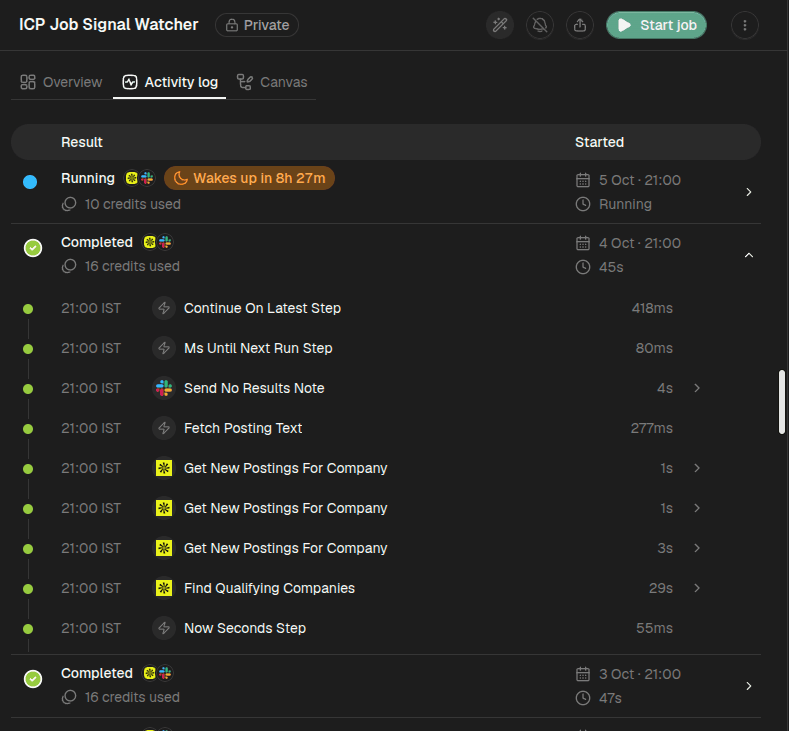
An agent's Activity log. Each row is one run, showing its status, the apps it used, the credits it used, when it started, and how long it took. Expanding a run lists every step it took, with the time of each step and how long it lasted.
Why Trelium uses both fixed steps and AI
Fixed steps and AI are good at different things, so Trelium uses each one where it fits.
| Fixed steps | AI | |
|---|---|---|
| Good at | Looking things up, applying rules, doing math, entering data | Reading emails and documents that are written in many different ways, matching them to the right records, spotting what's missing |
| How it behaves | Does exactly the same thing every time | Adapts to different wording and formats |
| What keeps it in check | Your business rules | Your business rules, plus a person when needed |
AI is very good at reading a customer's messy email, but like a person, it can occasionally misread something. That's why Trelium keeps AI to the reading and interpreting, and lets fixed rules decide what actually happens.
Why the split matters
AI can read a messy email. It cannot skip a rule.
Example: checking whether a company is a good fit
A sales team wants a quick answer to "is this company worth pursuing?" without researching it by hand. Their Trelium agent takes a company name posted in a team Slack channel and replies in the same thread with a verdict and any matching job postings. The same agent is shown on What is Trelium?.
Real workflows don't always run the eight stages exactly once, in order. This agent uses AI to read the request before it looks anything up, and uses AI again later to read job postings, so "Reason" appears twice below.
Trigger
Someone posts a request in a team Slack channel asking whether a specific company fits the team's ideal customer profile. The agent acts only on requests like this.
Reason: read the request
The agent works out which company or companies the message is about, including when one message names several. If it already asked "which one did you mean?" or asked for a website, it reads the person's reply in the thread to work out which company or website they meant.
Gather context
It looks the company up in Apollo, a company database, to find its profile, industry codes, website, and revenue.
Human review: ask instead of guessing
If Apollo finds no match, or several, the agent asks for clarification in the Slack thread instead of picking one. Here the person is not approving a result. They are giving the agent the missing information it needs, and the run continues from their answer.
Validate: check against the profile
The agent compares the company's industry classification with the team's ideal customer profile, which is the rule that decides whether the company is a fit.
Execute steps: find open job postings
It searches Apollo for the company's open job postings and fetches the full text of each one.
Reason: read each posting
The agent reads each posting to confirm it describes genuine office-based process work, such as order entry, purchasing, accounting, sales support, or customer service. It leaves out roles like warehouse, driving, or in-person retail.
Update systems: reply in the thread
It replies in the original Slack thread with the verdict and any matching job postings. If the check fails, the reply says so instead.
Log
The run appears in the agent's Activity log, with each step it took.
Where to go next
What is Trelium?
Trelium runs AI agents that handle repetitive office work, like entering orders from emails, inside the software your team already uses. Learn what an agent is, what work it handles, and where your team stays in charge.
Your First Workflow
Follow a customer email from start to finish: the agent reads it, drafts a reply from your documents, and waits for your approval.