
Agents & Workflows
What a Trelium agent is and how its workflow works. Covers the four parts of a workflow (trigger, steps, rules, and review points), how fixed steps and AI fit together, and an example from start to finish.
A Trelium agent is a workflow that does a job for your team. The workflow is the plan: what starts the job, what the agent does, what it checks, and where a person steps in. The agent is that plan, running. Trelium calls the written version of the plan an agent's Flow.
An agent is not a chatbot. You don't type questions to it and wait for a reply. It watches for work and does the job.
What a workflow is made of
Every workflow has four parts.
- A trigger. What starts a run, such as a customer email arriving or a schedule firing. See Triggers & Inputs.
- Steps. What the agent does, in order: look things up, read a document, apply a rule, prepare a record.
- Rules. What the agent checks before it enters anything. See Validation & Exceptions.
- Review points. Where a person looks at a result or approves it. See Human in the Loop.
What the trigger hands the agent, such as the email and its attachment, is the input. What the agent produces, such as a draft order or a reply, is the output. When a check finds a problem, such as a price that doesn't match, the case is called an exception.
Each time the agent goes through the workflow, that is called a run. A run can handle a single piece of work, such as one customer email, or several at once. Each run is one row in the agent's Activity log, with its steps, status, and the credits it used.
Fixed steps and AI steps
Some steps are fixed. The same input always takes the same path. Looking up an order, comparing a price to the agreed price, and entering a record are fixed steps.
Some steps use AI. These are the steps that need reading and interpretation, such as pulling line items out of a PDF or working out which order an email is about.
AI reads. Rules decide.
AI drafts a result. Rules check it. A person reviews anything unclear or risky. That order keeps the unpredictable part in a small, watched place.
What an agent works with
Agents work inside the software your team already uses, such as your order system, accounting software, email, spreadsheets, and supplier websites. If a tool offers a built-in connection for other software (called an API), the agent can use it. If it doesn't, the agent can work in the tool through a web browser. The agent does not replace any of these tools. Your order system stays your order system. See Integrations.
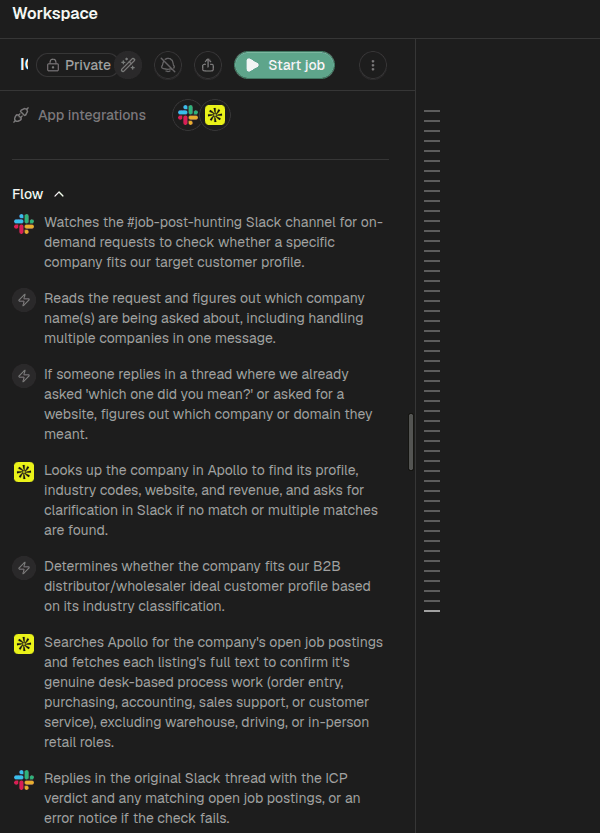
An agent's Flow: its workflow written out step by step. This agent checks whether a company fits a target customer profile, starting from a request in Slack.
Example: entering a purchase order
This example is a PO entry agent. It follows one customer email from start to finish. The full version, with the rules it checks and three example POs, is the Purchase Order Entry recipe.
flowchart LR
A[Customer email with PO arrives] --> B[Read the PO] --> C[Look up customer, items, and prices] --> D{Check against your rules}
D -->|All match| F[Create sales order draft] --> G[Log the run]
D -->|Something is off| E[Person reviews flagged lines] --> F
The purple step uses AI. The orange step is where a person steps in, and only some runs take that path.
A PO arrives as an email with an attachment. The agent reads it and pulls out the customer, the items, the quantities, and the prices. It looks up each item and checks the prices against what was agreed with that customer. If everything matches, it creates a sales order draft in the order system. If something is off, such as a price below the agreed price, the agent sends the flagged lines to a person first. Every run is logged either way.
Where to go next
Choosing a Workflow
How to pick the first job to give a Trelium agent. A short checklist covering how often the job happens, how it starts and ends, where the information lives, and how easy it is to check.
Integrations
Trelium agents connect to the systems you already use, through an API where one exists and through the web interface where it does not. Nothing is migrated or replaced.