
Human in the Loop
How your team stays in charge of Trelium agents. Covers what agents do alone, what they prepare for approval, what stays manual, when a run goes to a person, and how to give agents more freedom over time.
In a Trelium workflow, a person reviews or approves the steps that matter. Your team defines those review rules when you build the workflow, and the Trelium team helps you set them up. The rules are specific to your job, not one platform-wide review policy. The agent does the legwork, and a person makes the call on anything that involves money, promises to customers, inventory, or production.
Three kinds of work
Split every workflow into three groups.
- The agent does it alone. Steps with a clear right answer, such as looking up an order or filling in a draft.
- The agent prepares it and a person approves it. Steps where the result matters, such as releasing a sales order or sending a reply to a customer.
- A person does it. Steps that stay fully manual.
This split matters more than which technology you use. Most workflows have all three.
What should have an approval
Put an approval around anything that touches:
- Money, such as prices and payments
- Promises to customers, such as quotes and delivery dates
- Inventory
- Production
For example, an agent can prepare a sales order and still wait for a person to release it.
When a run goes to a person
A run goes to a person when the workflow says it should. Common reasons:
- The request is unclear or missing something
- A check failed, such as a price that doesn't match what was agreed
- The order is unusual, such as a quantity outside the limits your team set
- The step is one the workflow always sends for approval
Sometimes the person is not approving anything. They are supplying a missing detail, and the run carries on from their answer.
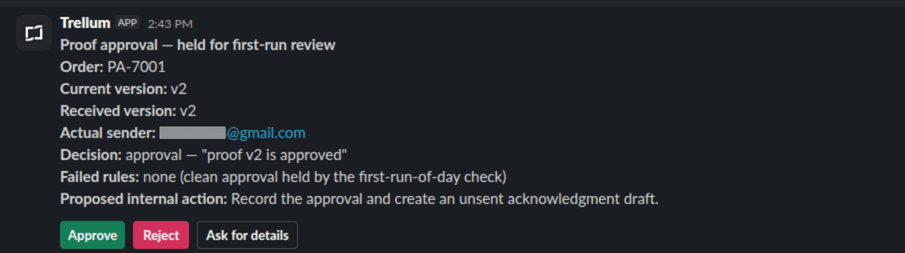
A run waiting on a person in Slack. Every check passed, but the workflow holds the first approval of the day for review, so the agent shows what it found and what it plans to do, and waits for Approve, Reject, or Ask for details.
Where the review request arrives
Review requests commonly arrive in Slack or by email. Which route is used is chosen with the workflow and the tools you have connected. The review screen in the examples shows controls such as Approve, Reject, and Ask for details. Ask for details (or Ask Customer) often means the agent gathers more information, such as drafting an unsent email, rather than editing a price or quantity inline. Whether a reviewer can change a value in place depends on how that workflow is built; settle it when you define the workflow.
After a person decides
When a person approves, the agent carries on from where it stopped, such as creating the sales order draft. When a person supplies a missing detail, the run continues from their answer. What happens after a rejection is set in the workflow: one agent might leave the work for someone to finish by hand, another might record the rejection and stop. There is no single platform-wide rejected state. Write the path down for each review point when you define the workflow, and confirm with the Trelium team how your agent carries it out. See Validation & Exceptions for how checks decide what goes to a person.
Example: three POs before 9 a.m.
Three customer POs arrive before the workday starts. The agent handles each one differently. The numbers below are made up to show the idea.
flowchart LR
A[PO 1: two lines priced below contract] --> E[Person reviews the two lines] --> D[Sales order draft created]
B[PO 2: customer not in the system] --> F[Stops and goes to the order desk]
C[PO 3: all items and prices match] --> D
The first PO has two lines priced about 6 percent below the agreed price. It goes to a person with those two lines flagged, and once they approve, the agent creates the draft. The second comes from a company the agent can't find in your customer list. Without a customer there are no agreed prices to check against, so the agent stops before creating anything and sends the PO to the order desk, along with what it read. The third has every item in the system and every price at the agreed rate, so it becomes a draft with no review. The Purchase Order Entry recipe walks through the same cases step by step.
Start tight, then loosen
Start with approvals around most steps. As the workflow handles your real exceptions well, let more of it run on its own. Base that on the unusual cases your team actually sees, not only the clean ones. A step with no approval should be one you have already seen the agent get right many times.
Where to go next
Runs, Retries & Failures
What a run is, what can go wrong at a step, and what to check before trying the work again.
Triggers & Inputs
How a Trelium agent knows there is work to do and what it receives when a job starts. Covers event and schedule triggers, the kinds of input an agent can read, and what happens when an input is unclear or incomplete.