
Runs, Retries & Failures
What a run is, what can go wrong at a step, and what to check before trying the work again.
A workflow describes a job. A run is one pass through that workflow, and each run has its own steps, status, and result in the agent's Activity log. A run can handle one request or several, so when something goes wrong, check which request inside the run it affected.
Ask the right question
When something goes wrong, the useful question is not just "did it fail?" It is "which step failed, what already happened, and what needs to change before we try again?"
Runs and steps
Say an agent handles email inquiries. Its workflow reads a message, checks a reference document, prepares a reply, asks a person to review it, and saves an approved draft.
The workflow is the same each time. The message and the answer are different. Each time the agent works through the workflow is a run, and each part of the job is a step.
Trelium's workflows include validation, an Activity log, and exception handling. These help your team review the work rather than judge it only by whether a final result appeared.
Where to see a run that went wrong
Open the agent's workspace and select Activity log. You can also open work from the Jobs board. Each row is one run and shows a status such as Running, Completed, or Cancelled, along with the apps it used and when it started. Other labels you may see on the Jobs board, such as Needs attention, group work for the team and are not the same list as run statuses. Open a run to see each step it took and when, which tells you how far it got. A business check that fails can still show completed steps (for example sending a review email) without the run being a technical failure. See Logs & Audit Trails.
Work that needs a decision reaches a person as a review request, such as a message in Slack or an email. Which route is used is set with the workflow and the tools you connect. Settle with the Trelium team during setup who should hear about a run that stops for a technical reason, and how. Until that is in place, make checking the Activity log part of someone's routine.
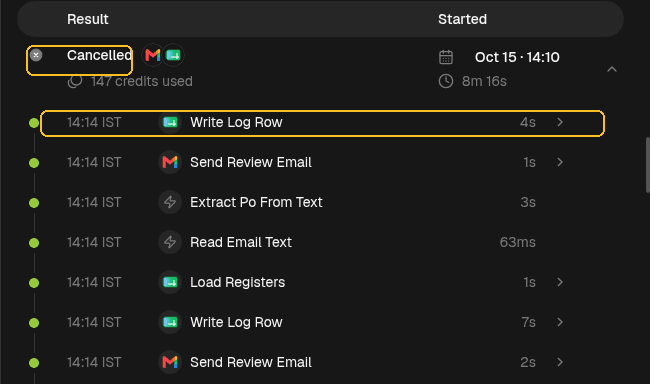
A run that did not finish, opened in the Activity log. The status shows how it ended, and the steps are listed newest first, so the top one is the last step the run reached.
A failed step is not the same as a bad request
There are different reasons a job might not reach its finished state:
| Situation | What needs attention |
|---|---|
| A tool cannot be reached | Check the connection or whether the tool is available. |
| The request is missing a detail | Get the missing information. Trying the same request again will not supply it. |
| Two records disagree | Review the difference and decide which information to use. |
| The agent cannot tell what a page is asking for | The run stops and surfaces as an exception. Your team looks at what happened. See Browser Agents. |
| The workflow needs approval | A person needs to make the decision. Waiting for that decision is not the same as a technical failure. |
Trelium routes exceptions and approval-sensitive work to people. A request that needs a decision should not be treated as a temporary connection problem. See Validation & Exceptions for how checks decide what goes to a person.
What a retry means
A retry means trying work again after an unsuccessful attempt. It can help with a temporary problem, such as a tool being unavailable. It does not fix a missing detail, a conflicting record, or a decision that belongs to a person.
Before trying again, check whether the cause has changed. Also check what the first attempt already did. A run can have useful completed work before a later step fails.
Some temporary problems are retried automatically, such as a short file-transfer failure. Optional Auto-Healing can try to fix a failure and then run the job again from the start. That is different from a person opening a run and deciding what to do next. Exact retry counts, delays, and which failures qualify are set with the product; do not assume a universal policy from these docs.
There is no single guaranteed outcome after every failure. A business exception follows the branches in your workflow. A run can wait on a person for credentials or approval. An unsupported browser challenge can stop the run. Notification settings can email your team when a job starts, finishes, is cancelled, or fails; settle during setup who should get those notices.
Check before repeating a change
If an attempt may already have sent a message or changed a record, check the destination before trying again. A missing confirmation is not proof that nothing happened. Some recoveries, such as continuing after a browser sign-in, are built not to repeat work that may already have been sent. Other protections are business rules in the workflow, such as checking that a PO number was not entered before. None of that is a promise of exactly-once behavior for every connector.
Reviewing failed work
The Activity log shows what a run did and where it stopped. To review a failure, work through it in order:
Start with the request
Find the request the run was handling. Everything else is easier to judge once you know what the job was.
Find the step that could not finish
Identify where the run stopped, and what it had already done before that point.
Check earlier changes
Look at the destination systems for anything the run already sent or saved, so nothing is done twice.
Decide what kind of fix it needs
It may be a connection repair, a corrected input, or a decision from a person. Only then try the work again.
If you are not sure how a particular failure should be handled, ask the Trelium team during setup or when it happens.
Example: a reply that could not be saved
Here is how that review works in practice. This is an illustration, not a description of an automatic retry policy.
The reply is prepared
An inquiry arrives by email. The agent checks the reference document and prepares a reply.
A person approves it
A reviewer approves the reply.
The save fails
The email tool is unavailable when the workflow tries to save the draft.
The team checks first
Your team checks whether the draft was created despite the error. If it exists, they do not create another one. If it does not, they address the connection problem before trying the unfinished work again.
The result is confirmed
After the next attempt, they check that the draft contains the approved reply.
The important distinction is between the work that was already reviewed and the step that could not finish. Repeating the whole job without checking could create a second draft or repeat an action that already succeeded.
Where to go next
Browser Agents
Trelium can automate software that has no API. A browser agent works in the tool's web interface the way a person logging in would, using a dedicated account you create for it.
Human in the Loop
How your team stays in charge of Trelium agents. Covers what agents do alone, what they prepare for approval, what stays manual, when a run goes to a person, and how to give agents more freedom over time.